Dialogue – the code
One of the first things that needs to happen for my new start to the game is dialogue. I may as well get that done now, since it’s going to be crucial to the game. But where to start?
Dialogue should live in an external file, that much I know. Makes things easier to edit, and will make translation far, far easier should my game ever get popular (I can always hope!). If I want to store it as an external file, I’m pretty sure XML or JSON is the way to go. I won’t explain them here, so if you haven’t heard of them, go look them up. I’m settling on XML for a couple reasons – First, I happen to know that Caves of Qud and Rimworld both make use of XML for imported data. Second, I’m familiar with XML.
Alright, so what does a dialogue file need to store? A couple variables, at least. Target’s name, job, description, maybe a graphic. But there’s a lot more. Let’s think about all the things a robust dialogue system needs to include, from simple to complex:
- The stuff mentioned above.
- A list of responses to choose from that lead to more dialogue.
- Alternate text if you talk to someone a subsequent time.
- The ability to ask to trade with someone or exit the dialogue altogether.
- Conditional dialogue choices. (Like “Give meat”. If I don’t have meat, I probably shouldn’t see the option!)
- Quest-triggered and quest-tracking dialogue.
- Simple string variables to replace in the text, like the character’s name or gender pronouns.
- Logic to handle what to do if the target has given multiple quests.
- Complex code to execute on selecting a choice. (Like picking a choice to accept a quest. That needs to get stored somewhere!)
That’s… a lot of stuff to account for. That being said, I was able to manage it, although it took writing out an entire initial dialogue with quests being given and stuff just to make sure I got it. It took a solid 6-8 hours for sure, but some of the result is shown here.
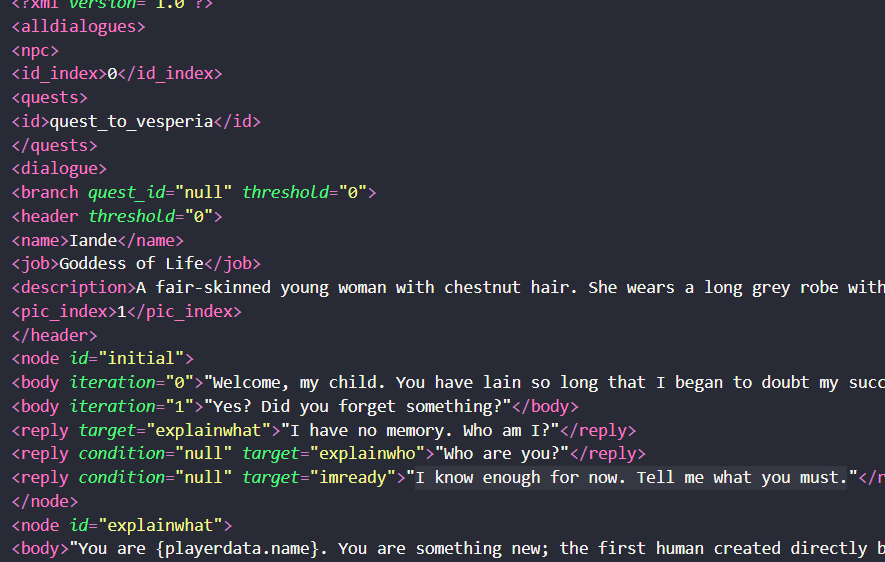
Suffice to say, I won’t dissect the entire system here. But I will explain that I made use of tag attributes to track certain things. Every time I make a new dialogue with new conditional statements, all I’ll have to do is all a special condition to a piece of code that knows how to read that condition string and what to do with it. For example, if
condition="class, inheritor"I can read that attribute in as a string and send this off to a special function that takes in 2 variables: trigger and requirement. I can tell this function that if trigger is “class” it needs to look at the player’s class for the second thing listed “inheritor”. If this function returns true, display this dialogue option, if not, don’t.
One last thing. It revolves around how to read in the dialogue file. I can either read in and store the entire file at the start of the game, or I can open the file, read and store a specified NPC’s dialogue, then close the file each time I have the player talk to somebody. Generally, the latter is bad practice – you don’t want to repeatedly opening a file and reading is cause that’s slow. But that’s the route I’m going to take, because initiating conversation with NPC’s won’t happen multiple times a second. I’m choosing to not have a large hitch on load with some memory being reserved in favor of a short hitch but no wasted memory every time we talk to someone. We’ll see if that’s a mistake!


You May Also Like

Second goal: A worldmap
Inventory – Putting it all together