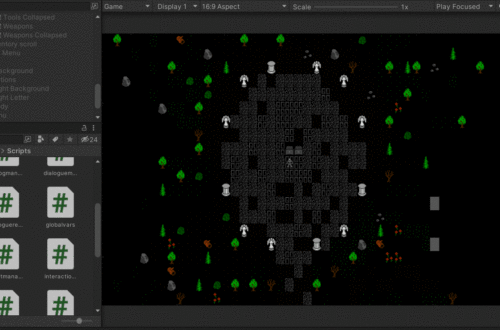
Setting up Unity
Alright. So let’s actually dig into my project and get this thing started. The first thing to do is set up our asset structure in Unity itself. This is largely for your own benefit. Your code doesn’t much care about where key files are located as long as it can point to them properly. But you as a developer will want things to be organized. There’s not really a single right way to do this, but I’ll share my structure:
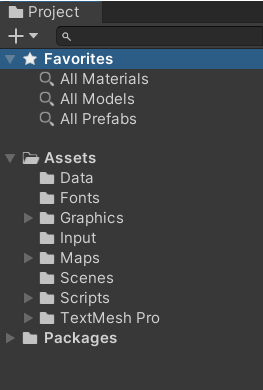
- “Data” is where I’m placing some csv data tables that I build externally (like in a spreadsheet) and import into the game. Largely, this is object data. By that, I mean data the game uses to know what an “E7” tile on a map refers to. Or what some of the colors and properties of items are.
“Fonts” is what it sounds like. There’s really only one font I’m using for the game, but this is where it goes. - “Graphics” is where I place spritesheets and atlases. Some generated resources like Tiles also end up going here.
- “Input” is specifically for Unity’s new Input System. It’s a single file, but it functions differently from just about anything else in my game, so it gets its own folder.
- “Maps” is similar to “Data”. It’s external files that I import into the game at runtime by reading the files. This gets its own folder, though, because there are going to be a lot of static maps or static map pieces.
- “Scripts” is where I store my C# files. I usually have a few sub-folders under here as well. One subfolder is for Common methods. These scripts have methods I’ll use over and over – like translating a 2D array to a 1D array, or converting a 2 digit alphanumeric code to a linear index. Another subfolder is for custom classes. My map is an array of cells. Each cell contains a custom class called an “LOS_Mapcell”. This LOS_Mapcell stores a ton of properties needed for each point on the map. Whether or not it can be seen through, walked through, what objects are in that cell, etc etc. I have several custom classes like this. LOS_Player, LOS_Basetile. Lots of stuff.
- “TextMesh Pro” is a folder created by the TextMesh Pro plugin. This plugin lets me use some rich text that can be generated dynamically.

You May Also Like
Making the map more real
Building Inventory Items – Sprites