Inventory – The Code
Whoof. Getting item generation and inventory display to work properly has been a tough nut to crack. Not in terms of code complexity, but in terms of wrestling with Unity and deciding how the game should store and ingest inventory data. I’ve landed on this:
- Master item data is stored in a spreadsheet in Google Sheets. This gets exported as a CSV that I can save in my assets and have the game ingest as a list of arrays, with each array being the data values for one item. This way, coming up with new items is literally as simple as adding a new row to the spreadsheet and overwriting the existing CSV.
At least, that was the original idea. Turns out that even simple ol’ Step 1 needed some reworking. Here’s the problem. Let’s say the game says “Generate a book for me! The one internally tagged as DC003”. How can we tell the game where to find that item in the master list of items? I could do a search through the list for the array containing the string “DC003” – after all, that’s why the item has a unique identifier. But I’m not crazy about having to search through a list of hundreds or thousands of items each time I need to generate a new item. Yes, it’s probably a pretty fast operation and it’s probably something I don’t need to worry about, but given I have no formal education with coding, I’m always wary of places where my code is inefficient. Plus, the unique name “DC003” has an index built right into the name. Wouldn’t it be nice if I could use that name AS an index to just jump straight to the proper array to pull data without a search?
If I want to find items by index like this, then the length and order of the CSV file matters. I have to tell the game something like “To find a document’s data in the list , take the index after “DC”. To find armor’s data in the list, take the index after “AR” and add 100.” So what then happens if I later discover I need more than 100 different documents in the game? I’ll have to go back to the code and tell it to find armor by adding something like 300 instead of 100. If I don’t want to do that, I’ll have to get a rough idea ahead of how many of each item kind I want to be in the game. That sucks both for planning and for eventually allowing modding of the game.
The alternative is to generate a separate list for each kind of item. So documents get their own CSV and armor gets its own CSV. That way, DC000 can be the first index in the document list and AR000 can be the first index in the armor list. I’ll only have 13 kinds of items, so 13 separate CSV files, which isn’t too bad to manage. I can extend each list as far as I want, so I don’t have to restrict number of items nor try to predict ahead of time how many of each I’ll want. - Adding an item to the player’s inventory is easy. The player has an empty list of LOS_items, and I can just Add any acquired item to that list. That step is easy at least.
- Displaying items in the game’s inventory screen. This is somewhat hard as I have to wrestle with Unity a bit. Essentially, I need to master layout panes. Each item line in the inventory is a prefab of sorts. Items are listed by category. If I add a new book, the book section needs to add a new line item and expand accordingly. Procedurally instantiating GameObjects frequently can be time intensive and is generally looked down upon. Object Pooling is generally looked upon more favorably. In a nutshell, Object Pooling says that before instantiating a new item, check the pool to see if there are any existing unused prefabs there. If so, grab it and repurpose it. If not, THEN instantiate a new one. When a prefab is no longer needed, instead of destroying it dump it back in the pool.
Once again, I’m probably optimizing too much. If I was dealing with an inventory of tens or hundreds of thousands of items, this would totally matter. With maybe a few hundred at most, probably not. But I’d still prefer to pool. (Or more accurately, for now I’m starting the game with 200 prefabs sitting in the pool. My game as of yet doesn’t make more if the pool is empty so if the player tries to have more than 200 items the game will crash. Good enough for now, but I will have to properly fix later.) - Navigating the menu to select items and display their information. I haven’t gotten this one yet as it’s going to be a little hard. This is next on the list of things to do. Right now, the player inventory list is randomly ordered. If I pick up 2 documents, one piece of armor, then another document, my inventory list will be: [0] document, [1] document, [2] armor, [3] document. But if I go to the inventory menu, it will display: [0] armor, [1-3] document. Plus, the documents in the player’s inventory won’t be in any specific order, while the ones in the inventory should be alphabetical (or sortable by other criteria!). So I see one of two solutions. 1) As player picks up items, it sorts them THEN so that when the inventory is displayed, it will be in the same order. This is shortsighted if I eventually allow the player to sort their inventory by different criteria. 2) Each prefab GameObject in the inventory display has some way of knowing which player inventory list item it is linked to. I think the easiest way to do this would be to store a short global array that acts as a 1:1 mapping table between item order in the shown inventory and item order in the player’s inventory. This isn’t very Object Oriented, but I also just need something fairly quick and dirty for this mapping.
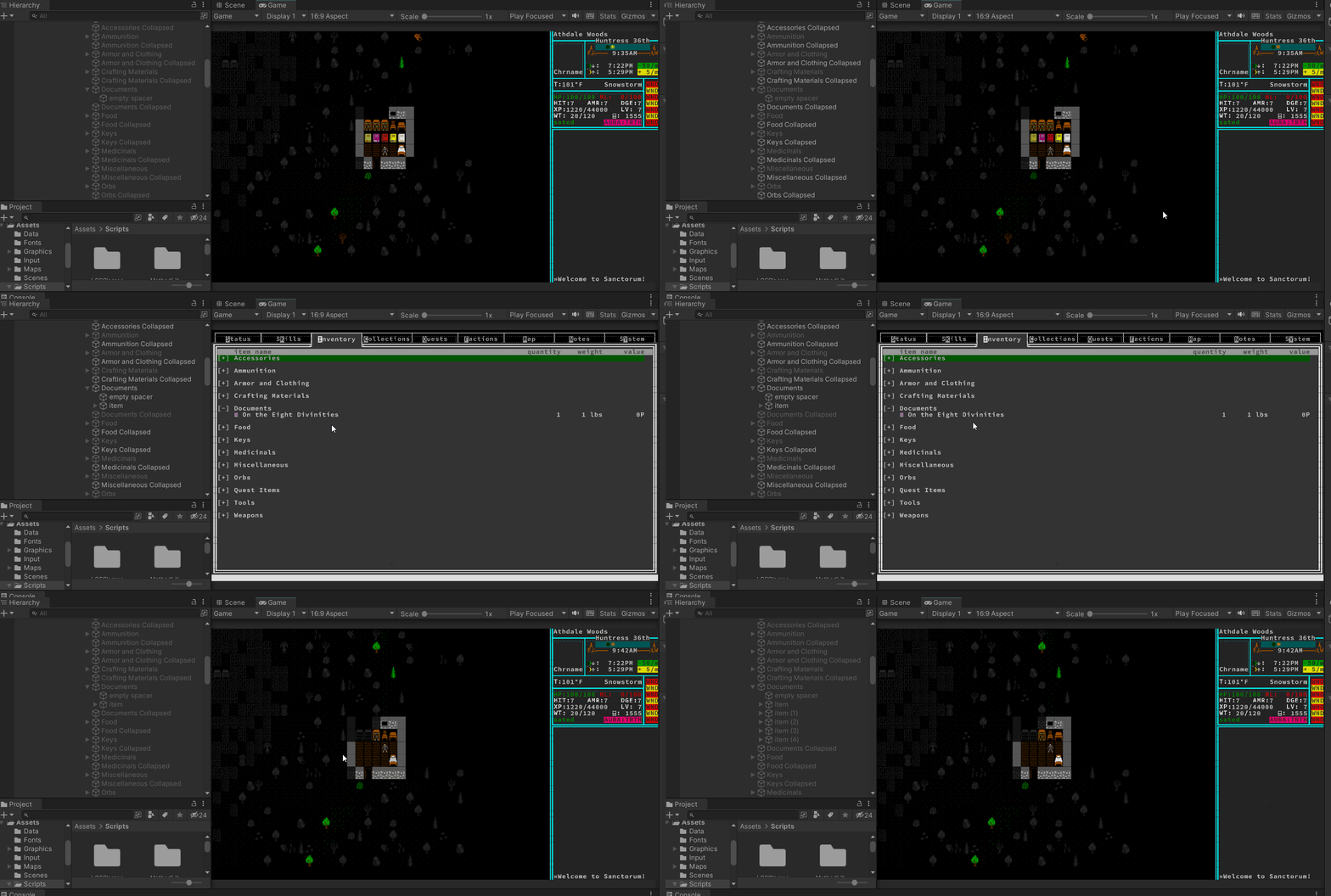
In the video below, note the “documents” container on the left in Unity and how it grows when I pick up something new and then open the inventory.


You May Also Like
First goal: Rendering a map – Color and style
Setting up Unity